Keep low rumble controlled, add a little body near 200 Hz, reduce some crowded midrange, and lift high-frequency scuff detail.
Measured game layer: 50 Hz high-pass · 200 Hz +4 dB · 3 kHz high shelf +3 dB · 7 kHz +6 dBRainbow Six Siege
Hear your cues.
Let the round shape the mix.
Follow Siege phases with AudioRouter’s built-in Duck trigger, then improve the footstep-to-gunfire balance with the EQ and dynamics tools already in your route.
Example settings are anonymized from the documented AudioRouter/Siege setup; device names and session IDs are omitted.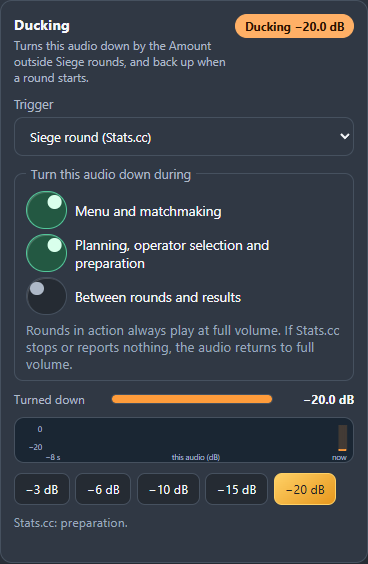
Auto-Ducking with Stats.cc
Let preparation settle. Bring the game up in action.
Stats.cc reports the game phase; AudioRouter’s Duck follows it locally while your route is playing.
- Put a Duck on the game-audio branch. Place it before the Mixer input that carries Siege. Keep Discord or voice chat on its own Mixer input so it stays at its chosen level.
- Choose “Siege round (Stats.cc)” as Trigger. AudioRouter follows the local game-state feed; no extra AudioRouter integration service needs to stay running.
- Set the amount and phases. A 20 dB reduction is a clear, reversible starting point. Choose whether Menu and matchmaking, Planning and preparation, and Between rounds and results should be ducked. Action rounds always play at full volume.
- Press Play and check the status. The Duck reports whether it is connecting, waiting for a game update, or following a known phase.
Menu / matchmaking−20 dB
Planning / preparation−20 dB
ActionFull level
Between rounds / resultsFull level*
*This example leaves the Between rounds and results option unchecked, matching the pictured Duck settings. Select it if you prefer the game quieter there too.First-time Stats.cc setup
Stats.cc’s optional game-state feed must be enabled once, then Stats.cc restarted. The feed setup helper in the AudioRouter repository’s examples/integrations/stats-cc-siege configures it; its readme explains the PowerShell steps. AudioRouter connects to loopback only. The observed Stats.cc listener itself binds all network interfaces without authentication, so keep inbound access to port 17892 blocked and do not add a firewall exception.
If the feed is missing, Stats.cc is stopped, or the state is unknown, AudioRouter releases the Duck and the game returns to full level. It never keeps game audio ducked because a phase update disappeared.
A measured footstep chain
More footstep detail, with a ceiling.
This example comes from labeled game captures and AudioRouter’s own DSP—not a one-size-fits-all preset.
Game audio→Footstep EQ→Compressor→Limiter→Duck→Mixer→Headphones
Bring quieter footstep cues forward relative to loud transients, with enough attack to preserve the click at the start of a step.
Documented chain: −42 dB threshold · 3:1 · 15 ms attack · 120 ms release · +6 dB makeupKeep sudden gunfire peaks under control after EQ and compression.
Documented ceiling: −1 dBFS · keep a Limiter last in the processing chainMeasured potential
Try a careful A/B before changing the mix.
On the labeled takes in the documented analysis, the revised EQ and compressor simulation improved the quieter half of step events by about 3.7–5.6 dB relative to gunfire. That result applies to those recordings and DSP settings—not every patch, headset, or player.
The next measured options were Balanced (6:1, 10 ms attack, 120 ms release) and Maximum (6:1, 5 ms attack, 80 ms release). Balanced is the gentler first experiment; Maximum can sound more aggressive and may make gunfire or ambience pump. Compare with an Input Switch and keep the −1 dBFS Limiter at the end.
Anonymized example profile
Game branch
  Footstep EQ
  Compressor  −42 dB · 3:1 · 15 / 120 ms
  Limiter     −1 dBFS
  Duck        Stats.cc · −20 dB
       ├─ Menu / matchmaking   on
       ├─ Planning / prep      on
       └─ Between rounds       off
  → Mixer → headphone output

Voice chat → separate Mixer input
Device names, node IDs, and session identifiers are omitted.Example values come from the documented Siege tuning work and the pictured in-app settings. Adapt the node order and values to your route, then listen and compare.
Build your own route
Start with the game. Add one tool at a time.
Browse the complete toolbox, then use the basic manual to put it together.